The Command Pattern
2023. 10. 21. 18:01ㆍ디자인패턴
728x90
문제 배경
리모컨을 만들려고 한다.
버튼마다 기능을 달리 해야한다.
그냥 짠다면 if else문으로 가능하지만 문제점이 있다.
문제점: 새로운 기능이 추가 or 변경된다면 기존 코드를 다시 수정해야한다.
재사용하기 어려움.
Command Pattern
: 객체의 요청(실행될 기능)을 캡슐화하여 재사용성이 높은 클래스를 설계
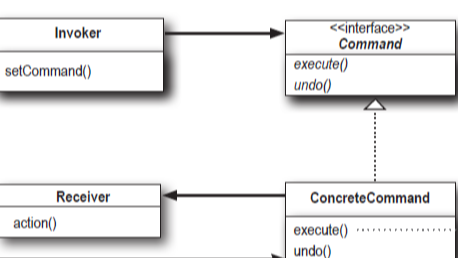
실행될 기능을 캡슐화함으로써 기능의 실행을 요구하는 호출자(Invoker)와
기능을 실행하는 수신자(Receiver) 사이의 의존성을 제거.
-> 개발자는 새로운 기능이 추가되면 ConcreteCommand만 수정하면 됨.
- Command: 실행될 기능에 대한 인터페이스
- ConcreteCommand: 실제 실행되는 기능 구현(Command 인터페이스 구현)
- Invoker: 기능의 실행을 요청하는 호출자 클래스
- Receiver: 기능의 실행을 수행하는 수신자 클래스
Receiver가 light라고 예를 들면

코드
public interface Command { //명령을 실행하도록 하는 인터페이스
	public void execute();
	public void undo();
}
public class LightOnCommand implements Command { //불 켜는 명령
Light light;
public LightOnCommand(Light light) {
this.light = light;
}
public void execute() {
light.on();
}
public void undo() {
light.off();
}
}
public class LightOffCommand implements Command { //불 끄는 명령
Light light;
public LightOffCommand(Light light) {
this.light = light;
}
public void execute() {
light.off();
}
public void undo() {
light.on();
}
}
public class RemoteControlWithUndo {
    Command[] onCommands;
    Command[] offCommands;
    Command undoCommand;

    public RemoteControlWithUndo() {
        onCommands = new Command[7];
        offCommands = new Command[7];
        Command noCommand = new NoCommand();

        for(int i=0;i<7;i++) {
            onCommands[i] = noCommand;
            offCommands[i] = noCommand;
        }
        undoCommand = noCommand;
    }
    public void setCommand(int slot, Command onCommand, Command offCommand) {
        onCommands[slot] = onCommand;
        offCommands[slot] = offCommand;
    }
    public void onButtonWasPushed(int slot) {
        onCommands[slot].execute();
        undoCommand = onCommands[slot];
    }
    public void offButtonWasPushed(int slot) {
        offCommands[slot].execute();
        undoCommand = offCommands[slot];
    }
    public void undoButtonWasPushed() {
        undoCommand.undo();
    }

}
public class RemoteLoader {
public static void main(String[] args) {
RemoteControlWithUndo remoteControl = new RemoteControlWithUndo();
Light livingRoomLight = new Light(“Living Room”);
LightOnCommand livingRoomLightOn =
new LightOnCommand(livingRoomLight);
LightOffCommand livingRoomLightOff =
new LightOffCommand(livingRoomLight);
remoteControl.setCommand(0, livingRoomLightOn, livingRoomLightOff); //0번은 light
remoteControl.onButtonWasPushed(0);
remoteControl.offButtonWasPushed(0);
remoteControl.undoButtonWasPushed();
remoteControl.offButtonWasPushed(0);
remoteControl.onButtonWasPushed(0);
}
}
매크로 command 만들기
Light light = new Light(“Living Room”);
TV tv = new TV(“Living Room”);
Stereo stereo = new Stereo(“Living Room”);
Hottub hottub = new Hottub();

LightOnCommand lightOn = new LightOnCommand(light);
StereoOnCommand stereoOn = new StereoOnCommand(stereo);
TVOnCommand tvOn = new TVOnCommand(tv);
HottubOnCommand hottubOn = new HottubOnCommand(hottub);

Command[] partyOn = { lightOn, stereoOn, tvOn, hottubOn};
MacroCommand partyOnMacro = new MacroCommand(partyOn);

remoteControl.setCommand(0, partyOnMacro, partyOffMacro);
728x90
'디자인패턴' 카테고리의 다른 글
| The Template Method Pattern (0) | 2023.10.22 |
|---|---|
| The Adapter and Facade Patterns (0) | 2023.10.21 |
| The Singleton Pattern (1) | 2023.10.21 |
| Decorator Pattern (2) | 2023.10.21 |
| The observer pattern (0) | 2023.10.19 |